
Picking ratelists for a new job
Every job needs a Pricelist and a Wagelist. They decide what you charge and what you pay for work of your staff members.
- Choose the company first.
- Check the Pricelist and the Wagelist. Both are required.
The system pre-selects the lists in this order:
- If the company has a default list, that one is used.
- If it doesn’t, and only one list is available, that list is used.
- Otherwise, the global default is used.
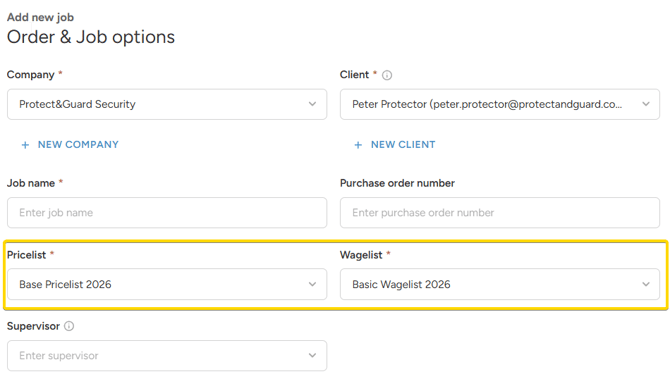
Jobs created by clients automatically get the company default or the global default.
Picking transport ratelists
You can’t add transport to a shift unless a transport pricelist and wagelist exist.
When a shift has transport, each trip (there and back) has its own pricelist and wagelist. If they aren’t pre-selected from the defaults, pick them for each trip.
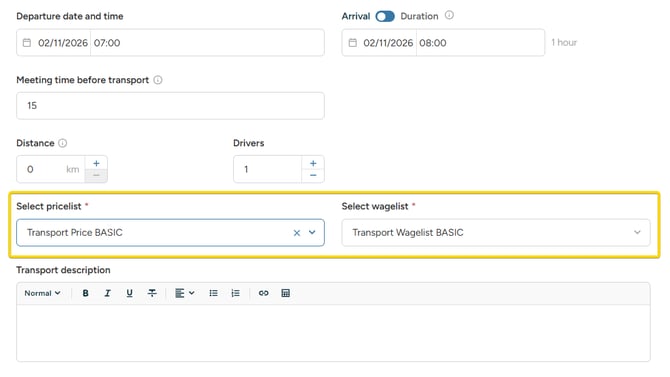
If you don’t charge or pay for transport, create a transport ratelist [with zero rates] so you can keep using the Transport feature.
Creating new order via copy
When you copy an order, all its jobs are copied with it, and they keep the ratelists of the original order. If the new order needs different ratelists, change them in Builder. See [link: Changing ratelists or overriding rates in Builder].
Copying an order from the legacy pricing system
If you used OnSinch’s legacy pricing system before New Ratelists were introduced, you can switch to ratelists when you copy an order that was created under it. The copy dialog will ask you to choose which ratelists to use.
-
Prices and wages in the copy are calculated from the ratelists you choose.
-
Manually set rates, effects, and requirement surcharges from the original order are not copied.
-
Jobs in the order that already use ratelists are copied unchanged, with their current ratelists.
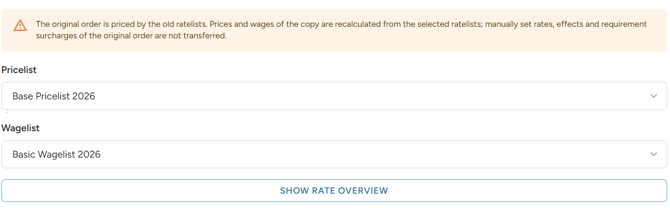
After copying, use Show rate overview to check the margin and make sure the prices and wages work as expected.
Changing the ratelists for an existing job
You can change the ratelists of an existing job, shift or position, or give it its own rates with a manual override:
- Migrate to a new ratelist version: after you update a ratelist
- Change ratelists or override rates in Builder: for one job, shift or position
- Change ratelists or override rates during shift closing: for corrections after the work is done