
How it works
You set time windows for each day of the week. The unit counts the part of the shift that falls into them.
Example - Night time:
- Window every day 22:00 – 00:00 and 00:00 – 06:00.
- A shift from 20:00 to 02:00 has 4 hours in the unit (22:00 – 02:00).
A shift that runs past midnight is split by day. Each part uses the windows of its own day. A Saturday night shift that ends on Sunday morning uses Saturday's windows until midnight and Sunday's windows after it.
How to set it up
- On the Units tab, click Add custom unit.
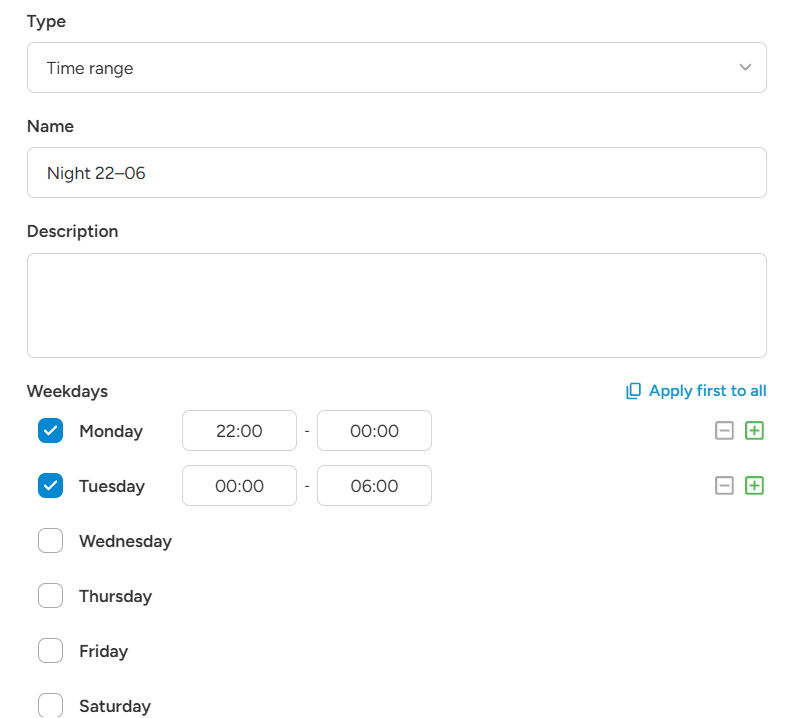
- Choose the type Time range and enter a name, for example "Night 22–06".
- Under Weekdays, tick the days you want.
- A ticked day is set to Entire day. To use your own times, click + next to the day and choose the start and end time.
- Add more windows to the same day with + if you need them.
- Use Apply first to all to copy the first day's windows to the other days.
- Click Save.
A window cannot run past midnight. Split it into two: for example 22:00 – 00:00 on Monday and 00:00 – 06:00 on Tuesday. An end time of 00:00 means midnight.
Windows on the same day cannot overlap.
Examples
- Night hours: every day 22:00 – 00:00 and 00:00 – 06:00.
- Weekend: Saturday and Sunday, Entire day.
- Friday night to Monday morning: Friday 18:00 – 00:00, Saturday and Sunday Entire day, Monday 00:00 – 06:00.
Night bonus on top of the base
- Rule 1: Always apply → Worked hours, €20 per hour, "Basic Hour Wage".
- Rule 2: Always apply → "Night 22–06", 50% of "Basic Hour Wage", "Night bonus".
A shift from 18:00 to 02:00 (8 hours, 4 of them at night):
- Base: 8 × €20 = €160
- Night bonus: 4 × €20 × 50% = €40
Total: €200.
Unit or condition?
- The Time range unit pays only the hours inside the windows.
- A time condition (beginning or overlap) decides if the whole rule applies. With Worked hours, it then pays all hours of the shift.
Good to know
- Times use your agency's time zone.
- Unpaid breaks are taken out of the hours a custom unit counts, the same as with Worked hours. Paid breaks count as work.
- Time range units work in all ratelist types, including transport and tag lists.