
Why you need priorities
Sometimes two rules cover the same time. For example, a Sunday rate and a night rate both apply on Sunday night. Without priorities, both rates are paid for those hours.
If only one of them should be paid, set a priority.
How it works
- Rules without a priority are always calculated, and they add up.
- Rules with a priority compete with each other. When their hours overlap, only the rule with the higher number is used for those hours.
- Outside the overlap, each rule is used as usual.
How to set it up
- Open the rule and click the Unit.
- Open Advanced options.
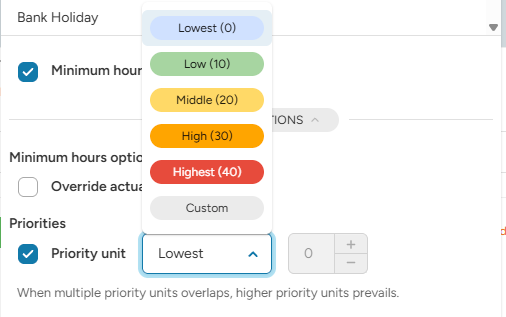
- Tick Priority unit.
- Choose a level, or Custom to enter your own number.
- Do the same for every rule that should compete.
Example
Three rules:
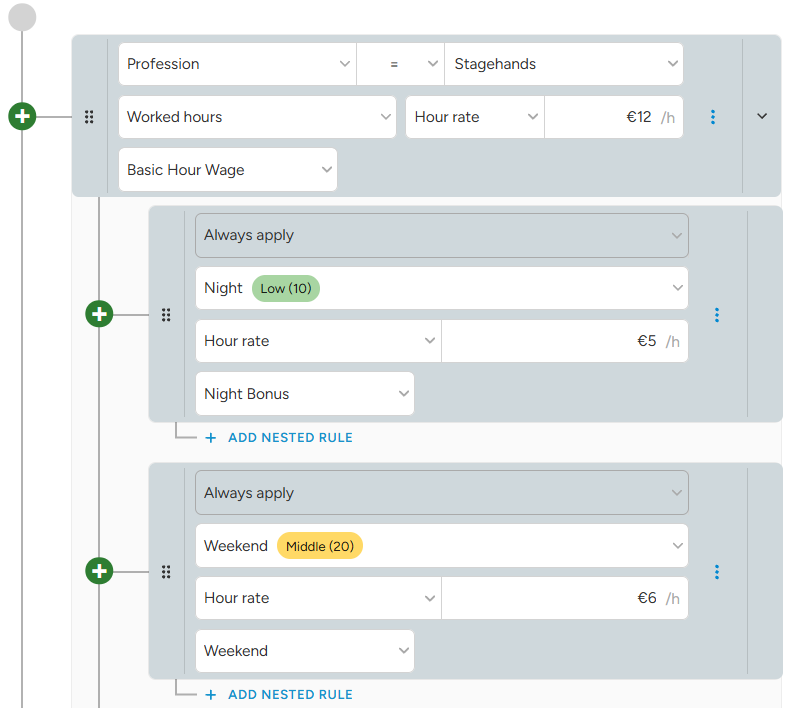
- Base: Worked hours, €12 per hour
- Night: Night hours (custom unit), bonus €5 per hour, priority low (10)
- Weekend: Saturday & Sunday (custom unit), bonus €6 per hour, priority middle (20)
Shift: Saturday 20:00 – Sunday 02:00.
- Saturday 20:00 – 22:00: Base only → €12. (2 × €12 =€24)
- Saturday 22:00 – 24:00: Base and Night bonus €5 (2 × €12 + 2 × €5 = €34)
- Sunday 00:00 – 02:00: Base, Night and Weekend overlap → Weekend wins over Night (2 × €12 + 2 × €6 = €36)
Good to know
- Rules with the same priority but different components are both calculated.
- Rules with the same priority and the same component are not paid twice for the same hours.
Example: base €20 and night €25, both “Basic Hour Wage” and Middle (20). Night hours pay only €20, from the rule that started first. Give the night rule a higher priority to pay €25.
Bonus rules that should always be added on top (for example a percentage night bonus) should have no priority.