
Ratelists consist of multiple rules, depending on the complexity of your rates. You can combine these rules using two main branching options, Nested rules and Else rules.
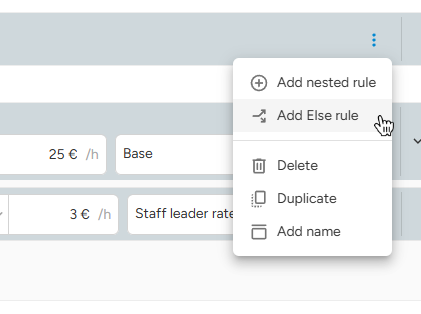
-
Nested Rule
-
- Stacking logic: "And also..."
-
Else Rule
- Fallback logic: "If not, then..."
Nested Rules
Nested Rules allow you to "stack" rules on top of each other to handle specific rate scenarios. Instead of creating a separate rule for every possible combination, you can start with a broad rule (e.g. "Hostess" profession) and nest another rule inside it (e.g. "Leader" role).
How it works:
The system only checks the Nested Rules if the main "parent" condition is met first.
- If the main condition is met, the system proceeds to check the rules inside (the "children").
- If the main condition is not met, the system immediately skips the entire group of nested rules.
Example:
A Hostess wage is €20/hr. If they are also a Shift leader, they get €4/hr lead bonus. If that leader is a senior staff (Rating higher than 30), they get an additional €2/hr bonus.
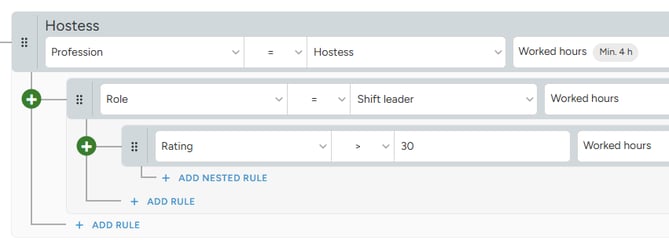
A staff member must be working in a position created for the hostess profession for the system to check if the Role is a Shift leader. If yes, the system then checks their Rating. If the position's profession is not hostess, the Role and Rating rules are skipped entirely.
- Not a Hostess → The main rule and all its nested rules are not applied.
- Hostess → €20 per hour.
- Hostess and leader → €24 per hour (€20 + €4).
- Hostess and leader with rating higher than 30 → €26 per hour (€20 + €4 + €2).
Else Rules
Else Rules allow you to create a fallback logic for when the first condition is not met. System checks available Else rules until it either finds a match or run out of Else rules in the group.
How it works:
- If the first condition is met, the system applies the rule and ignores other connected Else rules.
- If the first condition is not met, the system moves down to the Else rule to check if the next condition is met.
Example:
Staff members are paid differently based on their rating when working as Crew. There are in total 3 pay groups.
- Rating > 90 = €25 per hour.
- Rating > 80 = €23 per hour.
- Rating 80 and lower = €21 per hour.
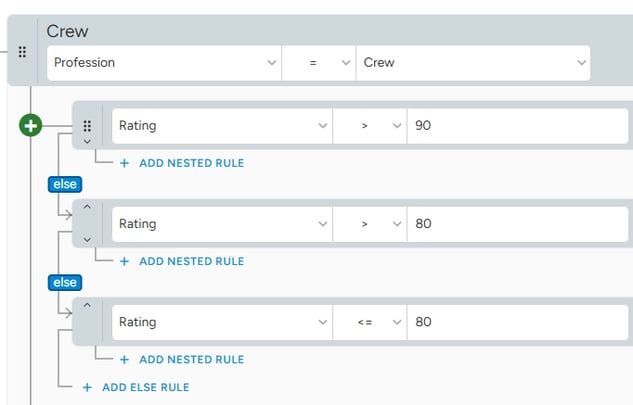
When position is created for the Crew profession, the system checks Rating of attending staff. The system scans the Else rules until it finds the first match. Once a match is found, the system applies that rate and ignores the rest of the tree. This ensures only one rate is applied.
For example:
- Rating 95 → €25 per hour.
- Rating 85 → €23 per hour.
- Rating 50 → €21 per hour.
Unlike Nested rules, the Else rules are not added together. The system simply finds the first match and after that ignores the rest.