
Types of custom units
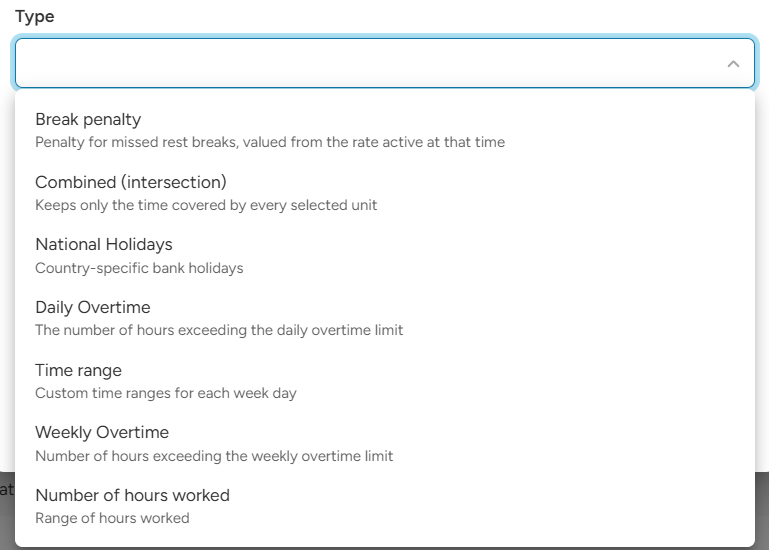
- Time range: hours that fall into time windows you set for each day of the week. For night, weekend or early morning work.
- National Holidays: hours worked on national holidays, and on Saturdays or Sundays if you want.
- Daily Overtime: hours above a daily limit, for example after 8 hours a day.
- Weekly Overtime: hours above a weekly limit, for example after 40 hours a week.
- Number of hours worked: a band of worked hours, for example from the 8th to the 12th hour of the shift.
- Combined (intersection): only the time that two or more units have in common, for example night hours on a holiday.
- Break penalty: extra pay or charge when a staff member did not get the required break.
Where you manage them
Custom units are on the Units tab of the Ratelists page. You can also create one directly in a rule: open the unit list and choose Add custom unit.
How to create a custom unit
- On the Units tab, click Add custom unit.
- Choose the Type. Each type has a short description under its name.
- Enter a Name that tells you what the unit counts, for example "Night 22–06".
- Add a Description if you want, for example who uses it.
- Fill in the settings for the type.
- Click Save.
The unit is now available in the unit list of every ratelist.
Using a custom unit in a rule
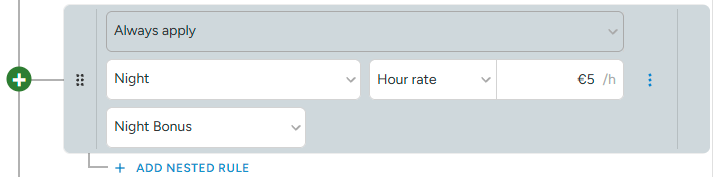
Choose the custom unit as the unit of a rule, then set the rate and component as usual. The rate is paid for the hours the unit counts.
Example:
- Unit "Night 22–06", Hour rate €5, component "Night bonus" → €5 for every night hour, on top of the base rate.
Good to know
- Unpaid breaks are taken out of the hours a custom unit counts, the same as with Worked hours. Paid breaks count as work.
- Minimum hours, priorities and rounding work with custom units the same way as with Worked hours.
- Transport ratelists cannot use Daily Overtime, Weekly Overtime, Combined or Break penalty. Tag ratelists cannot use Break penalty.
Changing, archiving and deleting
- Once a ratelist with the unit is used on a job, the type and settings cannot be changed. You can still change the name and description. If you need different settings, create a new unit.
- The unit shows how many ratelists use it (Used in X ratelists).
- A unit that is used in a ratelist cannot be deleted. Archive it instead. It stays in the ratelists that already use it, but it is no longer offered for new rules.
- You can unarchive a unit at any time.
Read more about ratelists
- Ratelists: Time range unit
- Ratelists: National holidays unit
- Ratelists: Overtime management
- Ratelists: Number of hours worked unit
- Ratelists: Combined unit
- Ratelists: Break penalty unit
- Ratelists: Units