
How it works
A percentage rate does not have its own amount in money. It takes the rate of another component (the base) and counts a percentage of it, for the hours of its own unit.
Hours of this rule's unit × rate of the base component × percentage
Example: The base rate is €20 per hour (component "Basic Hour Wage"). The night bonus rule has the unit Night and 50% of "Basic Hour Wage". The staff member works 3 night hours → 3 × €20 × 50% = €30 night bonus.
The base rate itself is still paid as usual. The percentage is added on top as its own component.
How to set it up
- Make sure the ratelist already has a rule with the base component, for example "Basic Hour Wage".
- In the rule for the bonus, choose the unit, for example the Night custom unit.
- Open the rate type list (it shows Hour rate by default). Under Percentage rate, choose the base component.
- Enter the percentage, for example 50.
- Choose the component for the bonus, for example "Night Bonus".
The list under Percentage rate shows only components that are already used in this ratelist.
Good to know
- If the base component is not used on the attendance (for example, its condition is not met or it is not set to Always apply), the percentage rule adds nothing.
- If the base rate changes, the percentage follows it automatically. Staff with a higher base rate get a higher bonus.
- If more than one rule with the base component applies to the same attendance, the percentage is counted from each of them, unless units have set priorities.
Give the bonus its own component to easily tell the base pay and the bonus apart in exports and payslips.
Percentage of total (tag ratelists only)
In tag wagelists and tag pricelists, there is one more option: the unit Percentage of total. It counts a percentage of the total wage or total price of the attendance (or of the position, if there is no attendance yet).
Example: The tag "Urgent order" adds 10% to the total price.
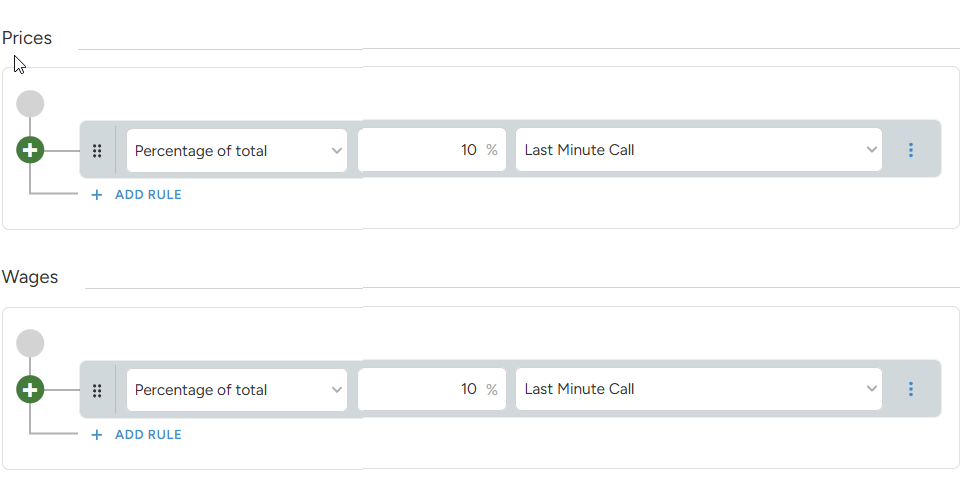
Use a negative percentage for a discount, for example -5%.