
The quick answer
- Number of hours worked (a custom unit): only the hours inside a band get the rate, for example from the 9th hour on. The first 8 hours stay at the normal rate.
- Attendance length condition: if the shift is long enough, the rule applies. Its unit then decides what is paid, for example all hours or a flat amount.
Number of hours worked unit: a rate for some hours
This is a custom unit. You create it on the Units tab, or directly in the rule with Add custom unit. You set a band, for example from 8 to 12 hours. Only the hours inside the band are counted.
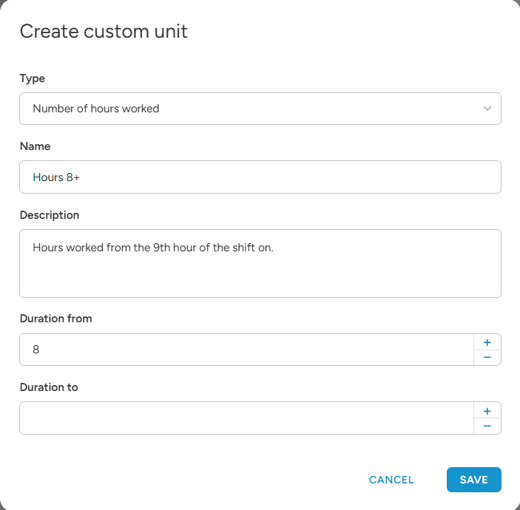
Example:
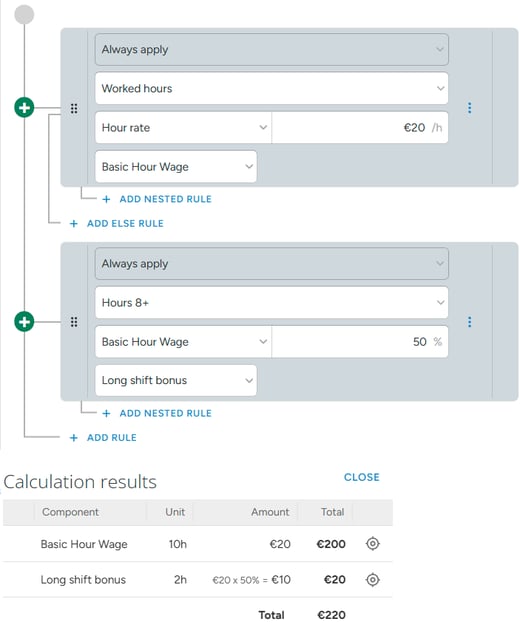
- Rule 1: Always apply → Worked hours, €20 per hour
- Rule 2: Always apply → unit "Hours 8+", 50% of "Basic Hour Wage"
- A 10-hour shift: 10 × €20 = €200, plus 2 × €20 × 50% = €20. Total €220.
Use it when the extra rate should start after a certain hour of the shift.
Number of hours worked always pays per hour. You cannot use it to pay a flat amount once the shift reaches a certain length. For a one-off bonus for a long shift, use the Attendance length condition with Flat rate.
Attendance length condition: a rule for the whole shift
The condition compares the length of the shift with a number, for example Attendance length > 10. If it is true, the whole rule applies.
Example:
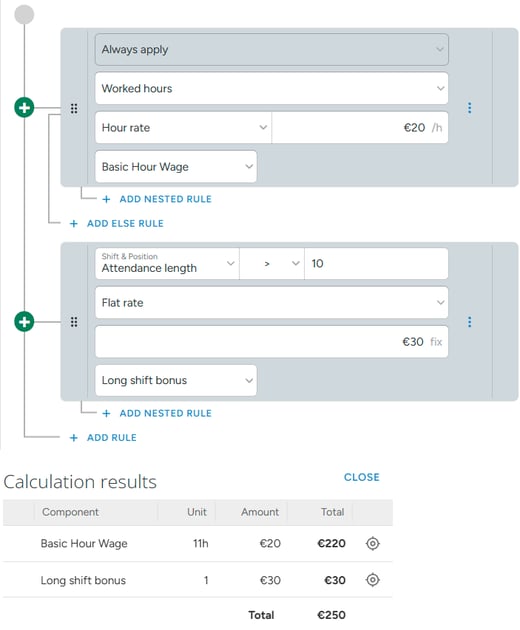
- Rule: Attendance length > 10 → Flat rate, €30, component "Long shift bonus"
- A 9-hour shift gets nothing. An 11-hour shift gets €30 flat.
Use it for a one-off bonus for long shifts, or for a different hourly rate for the whole shift.
If you combine the condition with Worked hours, all hours of the shift get the rate, not only the hours above the limit. For example, Attendance length > 10 → Worked hours, €25 per hour pays an 11-hour shift 11 × €25 = €275. If only the hours above 10 should get more, use the Number of hours worked unit.
What to choose
Ask yourself: when a shift is long, should staff get more only for the extra hours, or for the whole shift?
- Only the extra hours get more: use the custom unit Number of hours worked.
- Example: from the 9th hour on, +50%. A 10-hour shift gets 8 hours at the normal rate and 2 hours at +50%.
- A one-off bonus for a long shift: use the Attendance length condition with Flat rate.
- Example: a shift longer than 10 hours gets €30 once.
- A higher rate for every hour of a long shift: use the Attendance length condition with Worked hours, and put the normal rate in an Else rule. Without the Else rule, a long shift gets both rates.
Example:
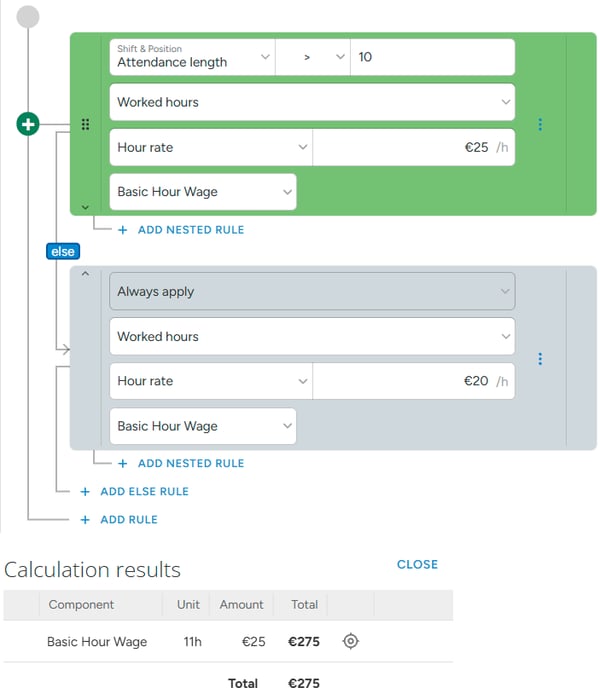
- Attendance length > 10 → Worked hours, €25 per hour
- Else rule: Always apply → Worked hours, €20 per hour
- An 11-hour shift gets 11 × €25 = €275. A 9-hour shift gets 9 × €20 = €180.
Good to know
- Both count only one shift. To count all shifts of a day or a week, use Daily Overtime or Weekly Overtime.
- Both skip unpaid breaks.
- Attendance length uses the actual times. For an open shift with no attendance yet, the planned times are used. To check the planned length, use the Position length condition.
- For the time worked after the planned end of the shift, use the Overtime unit.
Test both options in the Calculator with a short and a long shift.