
How it works
You set the rules for breaks:
- Break required after: how long a staff member can work before they need a break, for example 5:00 hours.
- Required break length: how long the break must be, for example 0:30.
The system checks each attendance:
- It starts counting at the start of work.
- When the time in Break required after is reached and the work goes on, a break is needed.
- If the staff member had an unpaid break of at least the required length by then, everything is fine. The count starts again after the break.
- If not, the break is missed and a penalty is added. The count starts again as if the break had been taken.
Example:
- Break required after 5:00, required break length 0:30.
- A 12-hour shift with no break has 2 missed breaks: one at 5:00 and one at 10:30.
Only unpaid breaks count. A paid break, or a break shorter than the required length, does not count as a break.
How much is paid
The penalty is valued at the rate the staff member was earning when the break was missed.
- The length of the penalty is the required break length, or your own length if you turn on Custom penalty length.
- The amount per hour is taken from the rates of the Penalized components that were active at that time.
Example:
- Base rate €20 per hour, penalty length 0:30.
- A missed break pays 0.5 × €20 = €10.
If the missed break falls into night hours where a night rate of €25 applies, it is valued from €25: 0.5 × €25 = €12.50.
If two rates are paid on top of each other at that time (for example base €20 and a night bonus €5, both selected as penalized components), each one adds its own penalty line: €10 + €2.50.
If two rates follow each other during the missed break (for example the day rate ends and the night rate starts), the penalty is charged once, from the higher rate.
How to set it up
- On the Units tab, click Add custom unit.
- Choose the type Break penalty and enter a name, for example "Missed break".
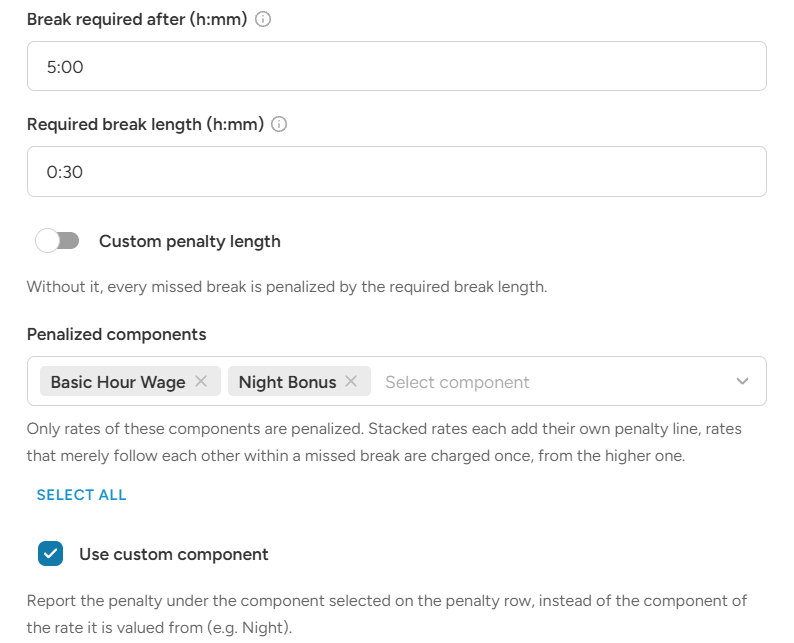
- Set Break required after (h:mm), for example 5:00.
- Set Required break length (h:mm), for example 0:30.
- Turn on Custom penalty length if the penalty should be longer or shorter than the break, and set Penalty (h:mm).
- Choose the Penalized components: the rates the penalty is valued from, for example "Basic Hour Wage" and "Night bonus". Use Select all to choose all of them.
- Leave Use custom component ticked if you want the penalty to be shown under its own component (for example "Break penalty"). Untick it to show the penalty under the component of the rate it was valued from.
- Click Save.
Then add a rule to your ratelist:
- Condition, for example Always apply.
- Unit: your break penalty unit.
- The rate is calculated automatically, so you do not enter an amount.
- Component: for example "Break penalty" (if Use custom component is ticked).
Good to know
- Minimum hours and rounding are not applied to the penalty.
- Only hourly rates with a fixed amount are used to value the penalty. Percentage rates and flat rates are not.
- If none of the penalized components is active when the break is missed, no penalty is added.
- Break penalty works in wagelists and pricelists only, not in transport or tag lists.