
Marking Attributes as Approval Required
Both Personal and Profile attributes can be marked with Approval required, meaning any value entered against them is subject to verification before it counts. This is the same setting used for certificates, licences, or any other field where you want a human check before you trust the data for example a forklift licence or a language certificate.
💡Tip: If you want to review your knowledge about Personal & Profile Attributes
Changes to Approved Profiles Require Sign-Off by admins
When an approved staff member updates an attribute that requires admin approval, the system preserves the current value until the change is reviewed.
Unlike unmonitored updates, changes to approval-required attributes do not take effect immediately. Instead, the update is queued for review while the original value remains active. This ensures data continuity and eliminates the need to inspect change logs to verify previous values.
What happens when an approved staff member edits such an attribute:
- the new value is queued as a pending change and does not take effect right away
- the staff member sees a "Pending changes" notice on their profile until an administrator reviews it
- the profile keeps using the original, approved value until the change is approved
- everything else on the profile - attributes without approval required -keeps updating instantly, exactly as before
⚠️ Treat this as a correctness fix rather than a new restriction: no data can be silently overwritten by an unreviewed edit anymore.
Reviewing Pending Changes
A staff member with one or more pending changes shows up with a "Pending changes" label. Opening the Review changes dialog lists every pending attribute at a glance, with the original value and the newly proposed value side by side.
Each row is decided individually:
| Action | Result |
|---|---|
| Approve | The proposed value replaces the current one on the profile |
| Reject | The proposed value is discarded: the current value is left untouched |
| Edit before approving | The value can be corrected inline - useful for an obvious typo, without sending the staff member back to fix it themselves |
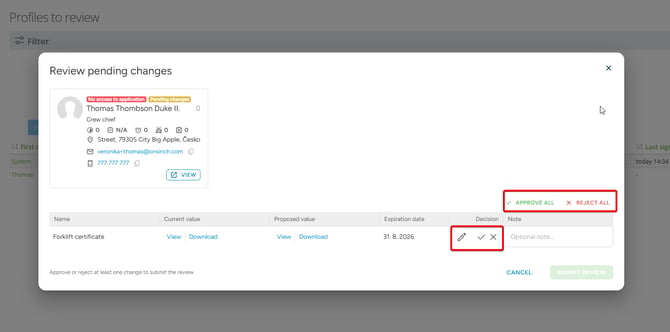
Once you close out the review, the staff member automatically receives an email summarising what was accepted and what wasn't, together with any comment you added to individual rows.
A Dialogue for the Initial Approval
Reviewing a newly filled profile happens in its own redesigned dialog window. It lists every attribute required for approval system and profile alike together with its value, in one place, so the decision doesn't require opening the full profile.
The same three-way choice applies:
- Approve the profile
- Decline the profile
- Edit a value directly before approving
An optional message travels with your decision by email. If the profile is declined, that message also appears in an info panel on the staff member's own profile. Declining never deletes or rolls back any of the staff member's data - the profile simply stays unapproved until resubmitted.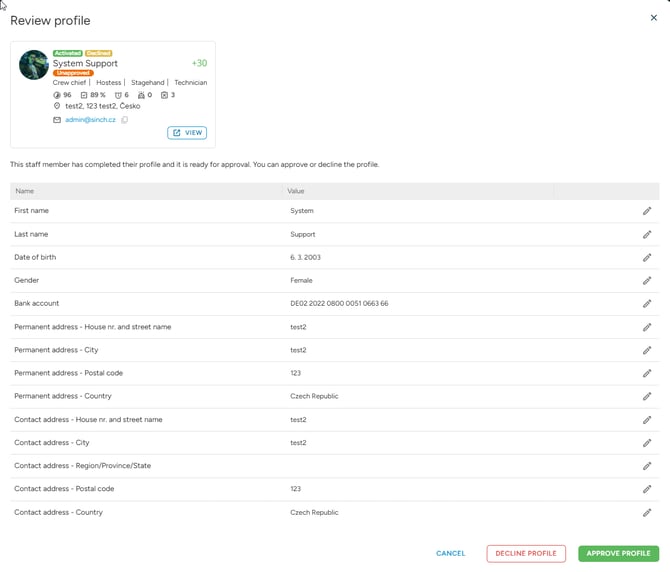
One List for Both Kinds of Review
Both review flows live on a single page: Staff → Profile checks → Profiles to approve. It lists staff members for two distinct reasons:
- Pending changes - an already-approved profile with edits awaiting review
- First-time approval - a newly filled profile awaiting its initial review
The page groups everything per staff member, but still supports filtering by which attribute changed. It is handy if you only want to work through, say, everyone whose forklift licence needs re-checking.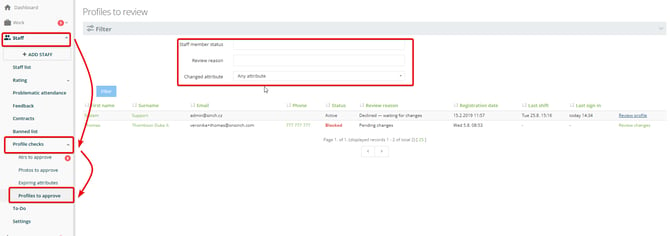
💡 Tip: The old approval page still mirrors the same data under the same filter for now, so the switch isn't forced overnight but it's worth getting used to the new page early, since it will eventually be retired.
Full Audit Trail
Every approval, decline, and reviewed change, including any comment you left. All is recorded in the staff member's history. If a profile was approved by mistake, use Change profile to unapproved to reverse it and send it back through review.
💡 Tip: Use the attribute filter on the Profiles to approve page to batch through one certificate or licence type at a time for example, clear every pending forklift licence change in one pass instead of reviewing staff members one by one.
Profile approval widget
The Profile approval widget brings the same overview onto your dashboard, so pending reviews are visible the moment you land on your OnSinch home page so no need to navigate to the Profiles to approve page first.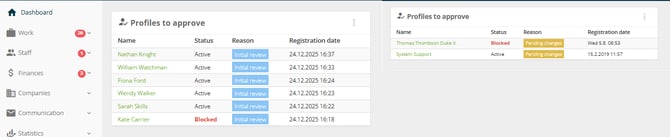
💡 Tip: The widget's settings include a status filter, letting you narrow it down to just one reason at a time for example, a dashboard focused purely on onboarding can show only First-time approval entries, while another can track just Pending changes. Like any other dashboard widget, it can be added more than once with a different filter on each, so both cases stay visible side by side.