
The unit represents exactly what the system measures. Once a condition is met, the system applies the rate to the selected unit to calculate the total for a wage or price amount.
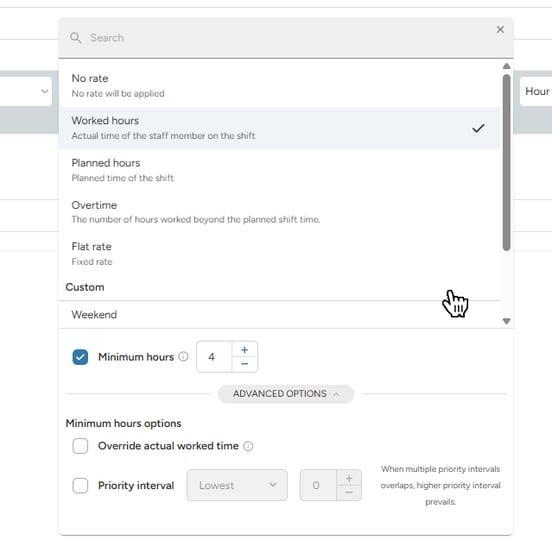
Worked hours vs. planned hours
Determine if your rates should be applied to the hours originally planned in the schedule or the hours actually worked by the staff.
- Worked hours: Based on the attendance time. If a staff member is scheduled for 8 hours but eventually only works 6, the system calculates rate for 6.
- Planned hours: Based on the original schedule. If a staff member is scheduled for 8 hours but eventually only works 6, the system still calculates rate for 8 hours.
Minimum hours ("minimum call")
Use this when you guarantee a minimum payment or charge (e.g., a 4-hour minimum call), even if the actual work is shorter.
- How it works: If the duration is less than the minimum, the system calculates rate for the set minimum. If the duration is more, the system calculates the actual time.
- Example: You charge €20/hr and minimum time is 4-hour call.
- Short call: Staff works for 2 hours → Rate is for 4 hours (€80).
- Regular call: Staff works for 6 hours → Rate is for 6 hours (€120).
Overtime
Overtime is used to capture and charge and pay differently for time worked beyond the scheduled plan.
-
How it works: The system compares planned hours (the schedule) against worked hours (attendance from closed shifts). If the staff member works more than the plan, the "extra" time is automatically assigned to the overtime unit.
- Example: You charge €20/hr for worked hours, and any time worked beyond the schedule is a +25% bonus on top.
- Planned schedule: 8 hours (€160)
- Worked in reality: 10 hours (€210)
- Result: The system calculates 10 hours at the standard worked rate, and for the 2 extra hours, it adds the 25% bonus (+€5 more per overtime hour).
Flat rate
A flat rate is used when the number of hours worked is not relevant to the price or wage.
-
How it works: The system simply applies the fixed rate once the condition is met. This is ideal for day rates that remain the same regardless of duration, or for adding fixed supplements per shift.
- Example:
- Rigger Day Rate: A flat €200 fee, no matter the shift length.
- Staff Leader Bonus: A fixed €15 bonus per shift on top of their standard hourly rate.
No unit
The "no unit" doesn’t calculate a value or measure time. It essentially acts as a "0" multiplier.
-
How it works: When a rule is set to "no unit," it triggers the condition but applies no price or wage. The system then looks at the nested rules underneath it to find the actual values.
-
When to use it: Use this to group multiple specific rules under one general category (e.g., a specific profession or role). This acts as a header that keeps your ratelist clean and easy to manage without adding extra price or wage.
Custom units
Custom units allow you to define specific time windows or hour thresholds.
-
Daily and Weekly Overtime: Automatically trigger higher rates once a staff member exceeds a specific number of hours in a single day or across an entire week.
-
Time range: Set specific time windows (e.g., night hours 22:00 – 06:00) or specific days (Saturday/Sunday) to which an extra rate should be applied automatically.
-
National Holidays: Define specific calendar dates where the system should apply holiday pay or surge pricing.
Note: Holidays units are maintained by us; if you would like to discuss specific holiday dates further, please contact our support team.
-
Number of hours worked: Set up rates based on the total number of hours worked (e.g., "The first 5 hours are €20/hr, the next 5 are at €21/hr").