
How it works
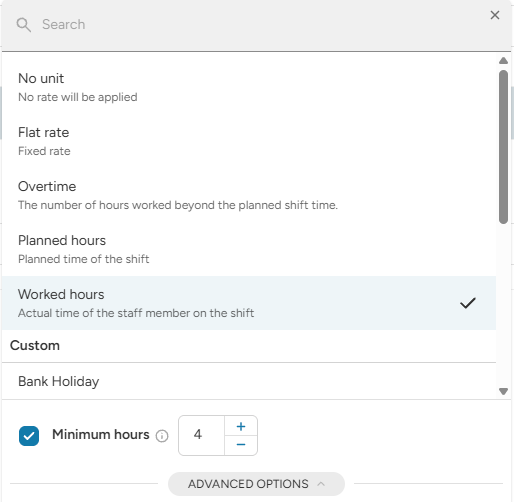
You can set a minimum on any rule with an hourly unit (for example Worked hours).
- If the time is shorter than the minimum, the system counts the minimum.
- If the time is longer than the minimum, the system counts the real time.
Example: €20 per hour with a 4-hour minimum.
- Staff member works 2 hours → paid for 4 hours (€80).
- Staff member works 6 hours → paid for 6 hours (€120).
How to set it up
- Open the rule and click the Unit.
- Select the unit, for example Worked hours.
- Enter the minimum in Minimum hours.
- Save the ratelist.
The rule then shows Min. 4 h next to the unit.
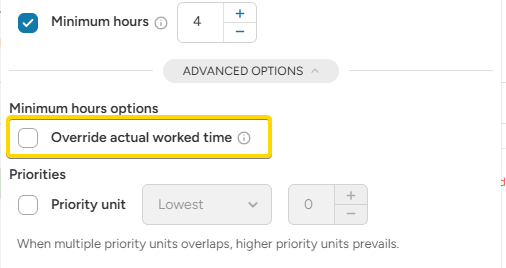
Override actual worked time
In Advanced options you can turn on Override actual worked time.
- Off (default): only this rule counts the minimum. Other rules still see the real attendance.
- On: the attendance is stretched to match the minimum. All other rules see the longer attendance too.
Example:
Shift from 20:00 to 21:00 (1 hour). Minimum 4 hours. Night bonus from 22:00.
- Off: Base is paid for 4 hours. Night bonus = nothing, because the real shift ended at 21:00.
- On: the shift is treated as 20:00 to 24:00. Base is paid for 4 hours and the night bonus is paid for 2 hours (22:00 to 24:00).
Use Override actual worked time carefully. It changes how all other rules are calculated for this attendance.
The minimum works per rule. If you have more rules, set the minimum on each rule where you need it.