Condition types
The Condition acts as a logic gate. It tells the system:
"Only if this specific requirement is met, should you apply this rule."
The system evaluates conditions using TRUE/FALSE logic. If a condition is met (TRUE), the rule is applied. If it is not met (FALSE), the rule is skipped.
Shift and position conditions
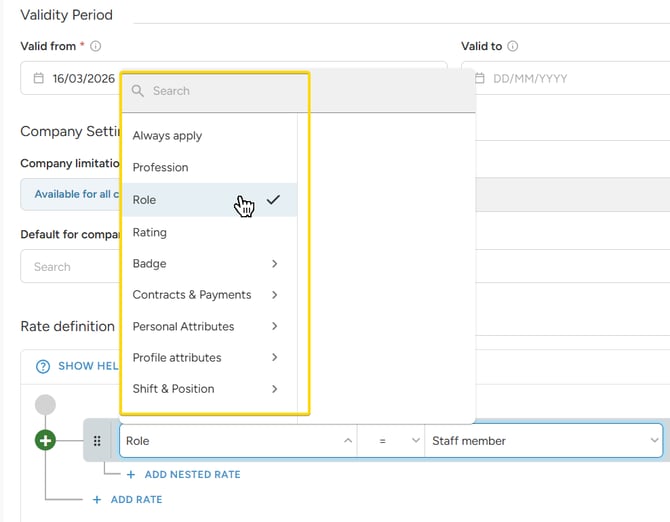
These rules look at the schedule and attendance information to decide if the rate applies.- Role: Set different rates for staff member, staff leader and standby role.
- Profession: Apply rates to one profession or group of professions.
- Attendance or position length: Set rates based on how many hours were worked or scheduled (e.g. Attendance length > 12 hours).
- Attendance or position beginning: Apply rule based on the specific start date or start time.
- Shift or position size: Apply rates based on the shift or position size - perfect for calculating different leader bonuses for larger teams.
Staff conditions
💡Available for wagelists setup only.
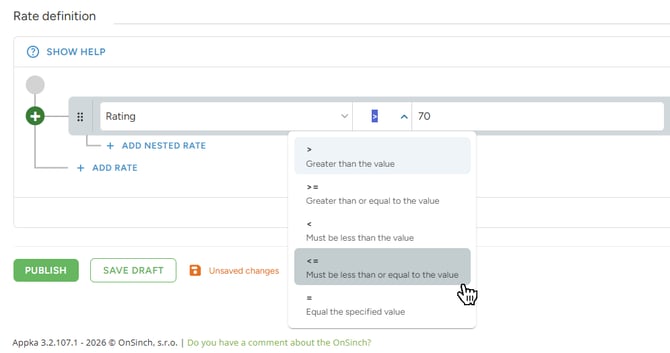
- Rating: Set a rate for a specific rating level (e.g., Rating = 70) or use operators to create groups (e.g., Rating 70 or less).
- Contract types: Differentiate pay based on the staff member's contract (e.g., freelancers vs. internal staff) or for subcontractor profiles.
- Badges: Use badges to reflect seniority across professions or special skills that require a higher pay rate or a specific bonus.
- Attributes: Use any custom field from the staff profile (e.g., certificate or language skills) if it affects their wage.
Always apply
This is a "catch-all" condition that is always TRUE. Perfect for logic that should apply to everyone regardless of other conditions, such as a universal night-hour bonus.
Logic operators
Operators define how strictly the system matches your data. Depending on the condition type, you will see different options:
-
Matching (Is / Any of / Is not): Used for role, professions or contracts as conditions.
-
Example: Profession is stagehand.
-
-
Presence (Has / Does not have): Used for attributes or badges.
-
Example: Staff member has "Level 1" badge.
-
-
Quantity ( =, >, <, >=, <=): Used for numbers like rating, shift length, or shift size.
-
Example: Attendance length is more than (>)10 hours.
-