
Changing the ratelist on a job
- Open the job in the job builder.
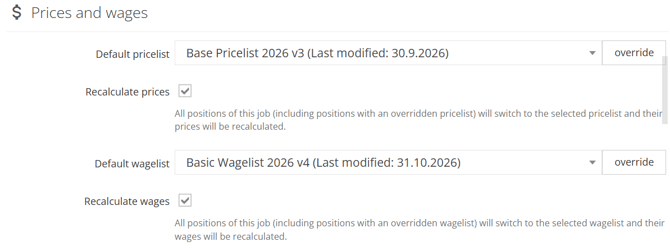
- In Prices and wages, choose a new Default pricelist or Default wagelist.
- Decide about the checkbox under it:
- Recalculate prices / Recalculate wages ticked: all positions of the job switch to the selected list and are recalculated.
- Not ticked: only the job default changes. Existing positions keep their lists. New positions get the new default.
- Save the job.
A warning icon next to the default shows that some positions use a different list than the job.
If the job has closed shifts, you cannot change its lists. Reopen these shifts first.
Changing the ratelist on a shift or position
- Open the shift or position in the job builder.
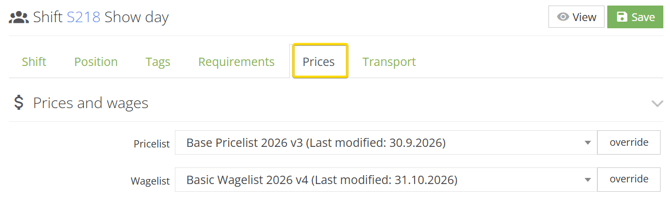
- Go to the Prices tab.
- Choose a different Pricelist or Wagelist.
- Confirm the message. For a shift, all its positions are recalculated. For a position, only that position is recalculated.
- Save.
Closed positions are not recalculated.
Changing the rates for one job only (manual override)
Sometimes one job needs special rates, but you do not want to change the ratelist for everybody. Use override.
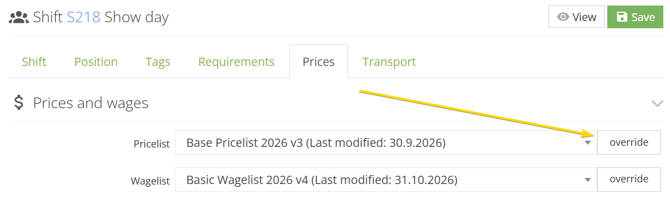
- Next to the pricelist or wagelist on the job, shift or position, click override.
- The Override ratelist dialog opens with the current rules.
- Change the rules, for example the hourly rate.
- Open Preview rates with this override to check the result.
- Click Save, then save the job.
The job, shift or position now shows Overridden ratelist. On the job level, tick Recalculate prices or Recalculate wages so that existing positions use the override too. The original ratelist does not change and other jobs are not affected.
Example:
- A client agreed to pay €2 more per hour on one festival job.
- On that job, click override next to the Default pricelist, raise the hourly rate by €2, and save.
- Only this job is charged the higher rate.
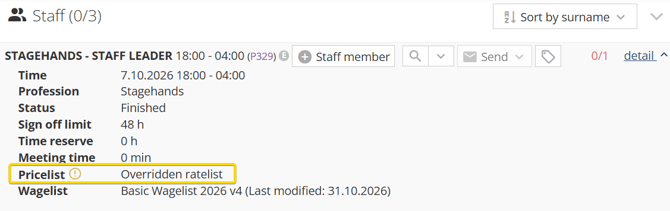
An overridden ratelist is not offered in the selection lists and cannot be a company default. It belongs only to the job, shift or position where you created it - it is one-time case.