
You can create a completely new price quote in Settings → Document templates → Add document template → select Price Quote/Calculation → Edit a template body .
❗Note: To use this function, you need to contact OnSinch support, who will enable it in your instance to be able to create any custom Price quotes
In this editor, we do have an open .html/twig source code in which a default Price quote document can be fully overhauled and customised to your specific business needs. In order to customise it more easily, we recommend to use any available free AI tool (ChatGPT, Gemini, Calude,...) if you are not proficient in html/twig coding.
In the middle you will see a window with a .html/twig source code - (Template body) of a basic Price Quote which is currently available in OnSinch. On the right side, you will see a list of Template reference values. Those values you can input in a template body and its code, to extract that information from OnSinch. Also this editor supports any graphic overhaul of the document. You can add any type of new font or new graphical structure in this editor to your new Price Quote.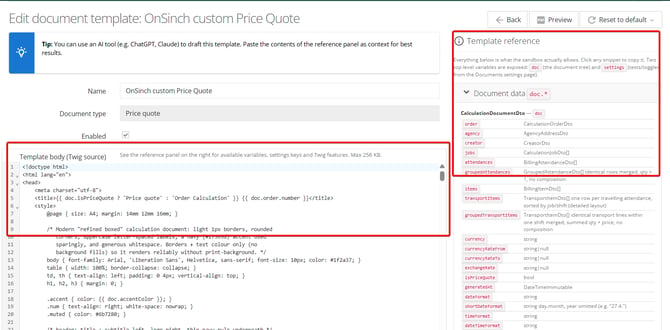
How to do that all that? Just check the video below in which we will describe step by step how to create a custom price quote to which we will add new fresh graphics and values to new colums in Price Quote.